
Mobile
Kikibet App & Mobile Casino
Add Kikibet to your home screen for quicker access to slots, live casino and sports.
Installing the Kikibet app experience adds a home-screen shortcut to Kikibet Casino, using the same login and balance you already have on the website. From that shortcut you can reopen Kikibet slots, sit at Kikibet live casino tables, place Kikibet sports betting wagers, or check Kikibet promotions without hunting for the browser tab.
 Even more faster withdrawals
 Secret EXTRA bonuses
 Loading up to 830% faster
 Maximum level of security

Installation on iOS
 1. Tap the three dots (or menu icon) in the browser bar.
 2. Find and tap the «Share» button in the list.
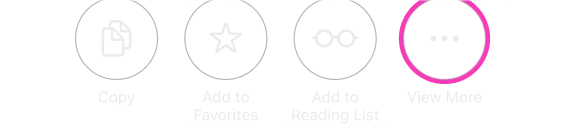 3. Select «View More» or scroll down to see all available actions.
 4. Find and tap the «Add to Home Screen» option with the plus icon.
 5. Tap the blue «Add» button in the top right corner to finish.
Please note: you cannot install the app in an incognito or a private window.

Installation on Android
- Open kikibet.co.uk in Chrome.
- Tap the browser menu (⋮).
- Choose "Install app" or "Add to Home screen".
- Confirm — launch Kikibet from your app drawer.


Play responsibly. Gambling should be fun, never a way to make money. Set deposit limits, take breaks, and get help if it stops feeling like a game.